
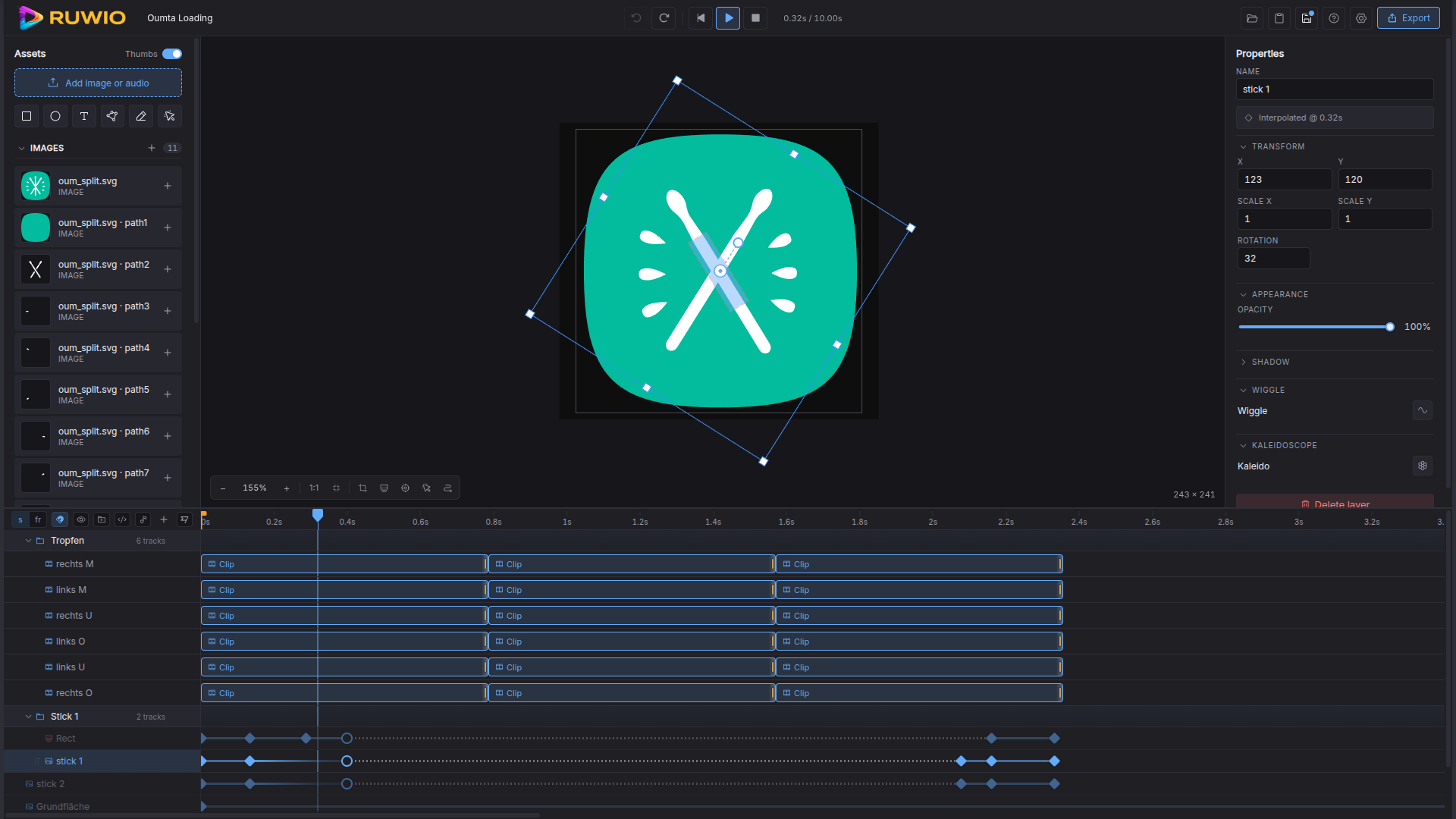
A timeline-based animation editor that runs in your browser.
---
RUWIO is a browser-native authoring tool for short interactive animations.
It pairs a Konva-driven canvas with a keyframe timeline, exports a
self-contained HTML/JS bundle, and ships everything as a Vue 3 single-page
app you can serve from any static host.
## Highlights
- **Keyframes everywhere** — animate position, rotation, scale, fill, stroke,
shadow, and shape-specific properties. Optional separated position /
rotation tracks. End keyframes terminate a layer cleanly.
- **Effects**
- **Kaleidoscope** — radial repeats of a layer or a clip instance,
with per-arm time offset for time-pinwheel effects.
- **Wiggle** — deterministic procedural shake (position + rotation).
- **Masks** — destination-in / destination-out cascade, scoped to
track groups, clips, and SVG assets.
- **Asset kinds** — rect, circle, polygon (with vertex / bezier editing),
freeform path, text (14 bundled Google fonts + custom .woff2 / .ttf
upload), images, audio, button-with-states, nested SVG assets, and
reusable clips with their own internal timeline.
- **Scenes** — multiple pages per project; jumpToScene / jumpTo / jumpToFrame
scripted actions; markers; per-scene background video and audio tracks.
- **Render parity** — the canvas2d offline renderer, the Konva live stage,
and the exported runtime all share the same sampling math. What you see
on stage is what gets exported.
- **Eyedropper** colour picking, **motion-path** overlay, global
**seconds / frames** display toggle, custom font upload to
localStorage — the polish kit.
## Quickstart
```bash
npm install
npm run dev # start the editor at http://localhost:5200
npm run type-check # vue-tsc strict pass
npm run build # production bundle to dist/
npm run pack # zip dist/ into dist-archive/
```
## Electron desktop build
RUWIO can also run as an Electron desktop app. The desktop shell uses the
same Vite-built app from `dist/` plus the compiled Electron entry points in
`dist-electron/`.
```bash
npm install
npm run desktop:dev # start Vite, then launch Electron against localhost
npm run desktop:pack # build an unpacked desktop app into release/
npm run desktop:build # build platform installer/package artifacts into release/
```
`desktop:pack` is the quickest compile check because it produces an unpacked
app without creating an installer. `desktop:build` uses `electron-builder` and
targets AppImage on Linux, NSIS on Windows, and DMG on macOS.
Desktop MP4 export runs inside Electron and uses ffmpeg from
`resources/bin//` in packaged builds. The build scripts run
`npm run stage:ffmpeg -- --optional`, which copies `FFMPEG_PATH` or `ffmpeg` on
`PATH` into `bin//` when available. For release artifacts, replace
that local copy with redistributable static ffmpeg binaries for Linux, Windows,
and macOS.
If no bundled binary is present, MP4 export still falls back to `FFMPEG_PATH`
or system `ffmpeg` and reports a clear error when neither can be executed.
Before shipping bundled ffmpeg, document the binary source, version, configured
codecs, and GPL/LGPL obligations for that build.
## MP4 render server
MP4 export is handled by the optional render server in `server/`. It binds to
`127.0.0.1:6000` by default and requires a token before it will accept render
jobs.
```bash
cd server
npm ci
HOST=127.0.0.1 PORT=6000 RENDER_TOKEN="choose-a-long-random-token" npm start
```
Point the app at the server with matching Vite env values:
```bash
VITE_RENDER_SERVER=http://localhost:6000 VITE_RENDER_TOKEN="choose-a-long-random-token" npm run dev
```
The server exposes `HOST=0.0.0.0` only when explicitly requested. If you expose
it beyond localhost, set `RENDER_ALLOWED_ORIGINS` to the exact app origins that
should be allowed. Chromium sandboxing stays enabled by default; use
`CHROME_NO_SANDBOX=1` only for a deployment environment that cannot run the
sandbox.
The included `docker-compose.yml` keeps the published host port on
`127.0.0.1:6000` and requires `RENDER_TOKEN` in the environment before it will
start.
Render-server checks:
```bash
npm run test:render-server # health/auth/validation route smoke
npm run test:render-server:e2e # renders a tiny MP4 and verifies it with ffprobe
```
The E2E check requires Chromium, ffmpeg, and ffprobe. Set
`PUPPETEER_EXECUTABLE_PATH` when Chromium is not at `/usr/bin/chromium`.
## Stack
- Vue 3 (`